Sketch to floor plan
Your sketch in. A clean plan out.
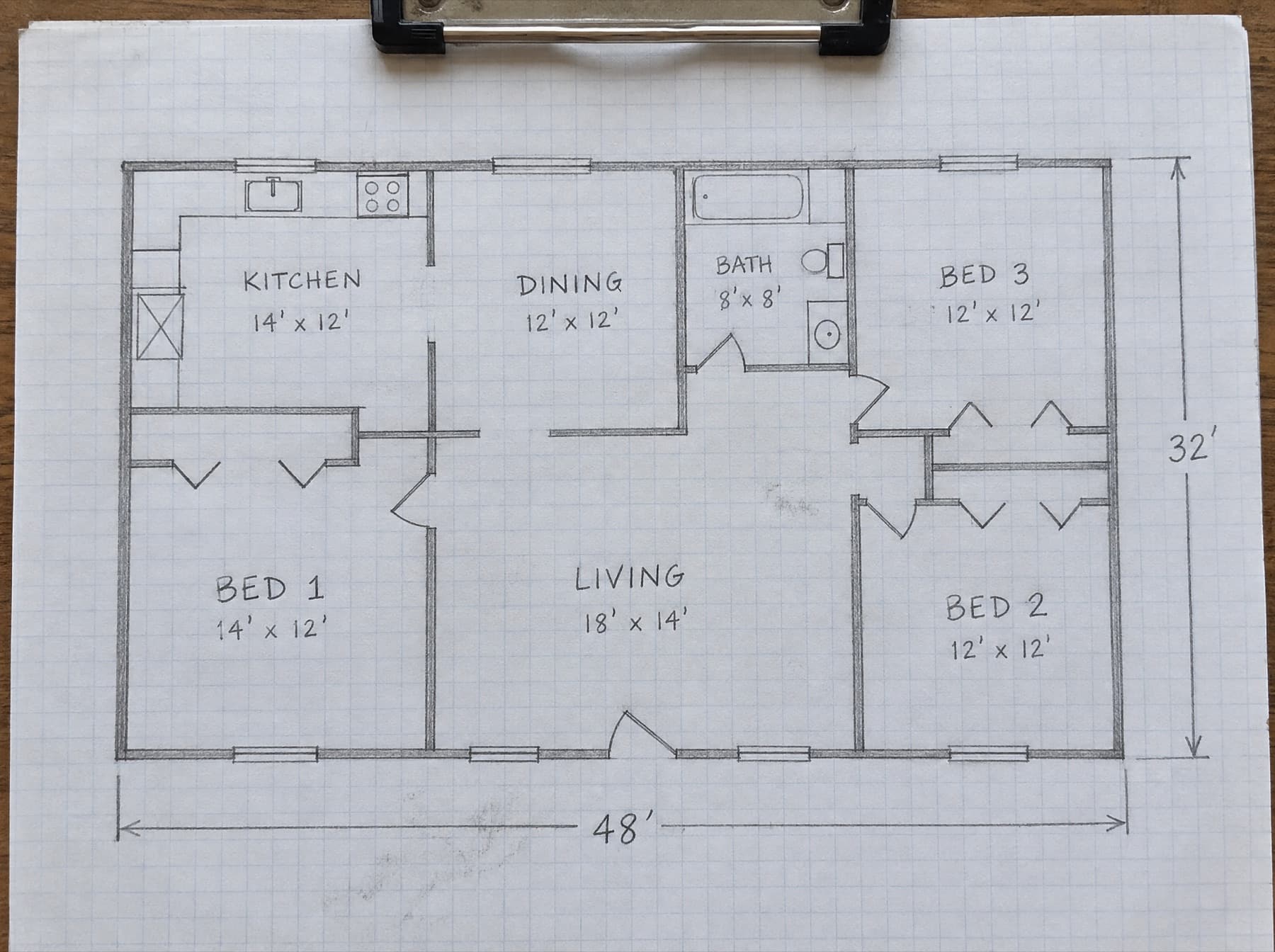
Photograph the sketch you drew on site. Get a dimensioned plan you can edit.
Floor plans included with every report.
Area calculation · ANSI Z765-2021
- Level 1 · 48'-0" × 32'-0"
- 1,536 sq ft
- GLA · above grade
- 1,536 sq ft
- Non-GLA · garage, porch, basement
- None
01On site
One photo of the clipboard.
Keep sketching the way you do. Snap it when you finish the walk.
- No LiDAR, no new hardware
- Your measurements stay the source
Floor plan sketch02ANSI Z765-2021
Drawn the way reviewers expect.
Exterior dimensions on every wall and an area calculation, ready for the exhibit.
- GLA to the whole square foot
- Non-GLA listed on its own line
- Room names inside the footprint
SampleBuilding sketch
123 Oak St · Form 1004 exhibit
Area calculation · ANSI Z765-2021
- Level 1 · 48'-0" × 32'-0"
- 1,536 sq ft
- GLA · above grade
- 1,536 sq ft
- Non-GLA · garage, porch, basement
- None
Living area computed from exterior dimensions per ANSI Z765-2021.
03Editable
Every wall stays editable.
Drag a wall or rename a room. The area recalculates as you go.
Floor plan editorFully editableSelected
Wall · Bed 2
GLA · from exterior
1,536 sq ft

On site
Your measurements stay the source.
Keep sketching the way you do. Snap it when you finish the walk.
FAQ
Floor plans, answered.
Do I need LiDAR or special hardware?
No. Photograph the measured sketch you already draw on site. Your field measurements stay the source of truth.
What goes on the finished sketch?
Exterior dimensions on every wall, room names, and an area calculation with GLA to the whole square foot. Garages, porches and basements are listed apart from GLA.
What if a wall comes out wrong?
Drag it, rename a room or fix a dimension in the editor. The area recalculates, and you approve the plan before it goes in the report.
Does it cost extra per plan?
No. Floor plans are included with every report. There is no per-plan add-on fee.